


Many users find that the sales data for the same product displayed on Shopdora’s web version and plugin version are not identical, leading to confusion about which set of data is accurate. In reality, this discrepancy is not an anomaly but stems from differences in data sources, update mechanisms, and algorithmic processing methods. To help users correctly understand Shopee product sales data and make more accurate judgments in product selection and competitive analysis, this article will explain in detail the sales data sources, reasons for data discrepancies, and how to flexibly choose based on needs.
Plugin vs. Web Version | Quick Guide to Competitive Analysis Data Selection
To ensure scientific and reliable analysis, it is recommended to choose one data source as the primary basis for analysis and the other as a reference.
Below are efficient selection suggestions based on scenarios:
- Choose Plugin Version: When you need to monitor real-time sales data, check SKU data, product monthly sales are less than 1000, or when web version data appears abnormal.
- Choose Web Version: When sales data requires high accuracy, front-end access is inconvenient, or product monthly sales are greater than 1000.
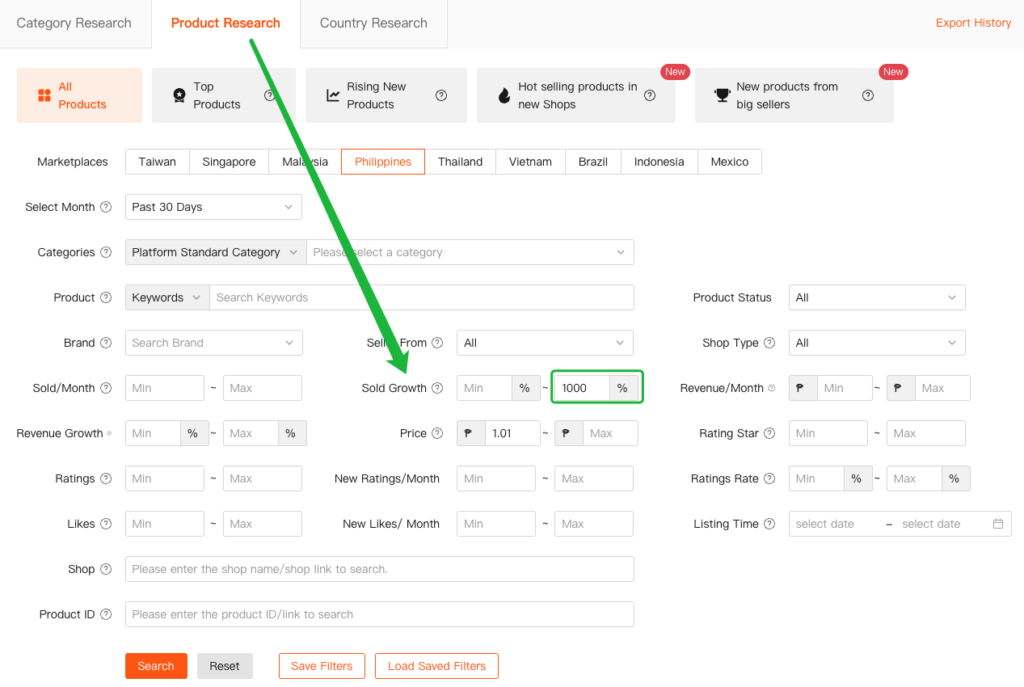
(Set the maximum value of “Monthly Sales Growth Rate” to “1000” to filter out sales in thousands.)
More explanations below.⬇️
1. Sales Data
1.1 Sources of Sales Data
The generation methods for various sales data are as follows:
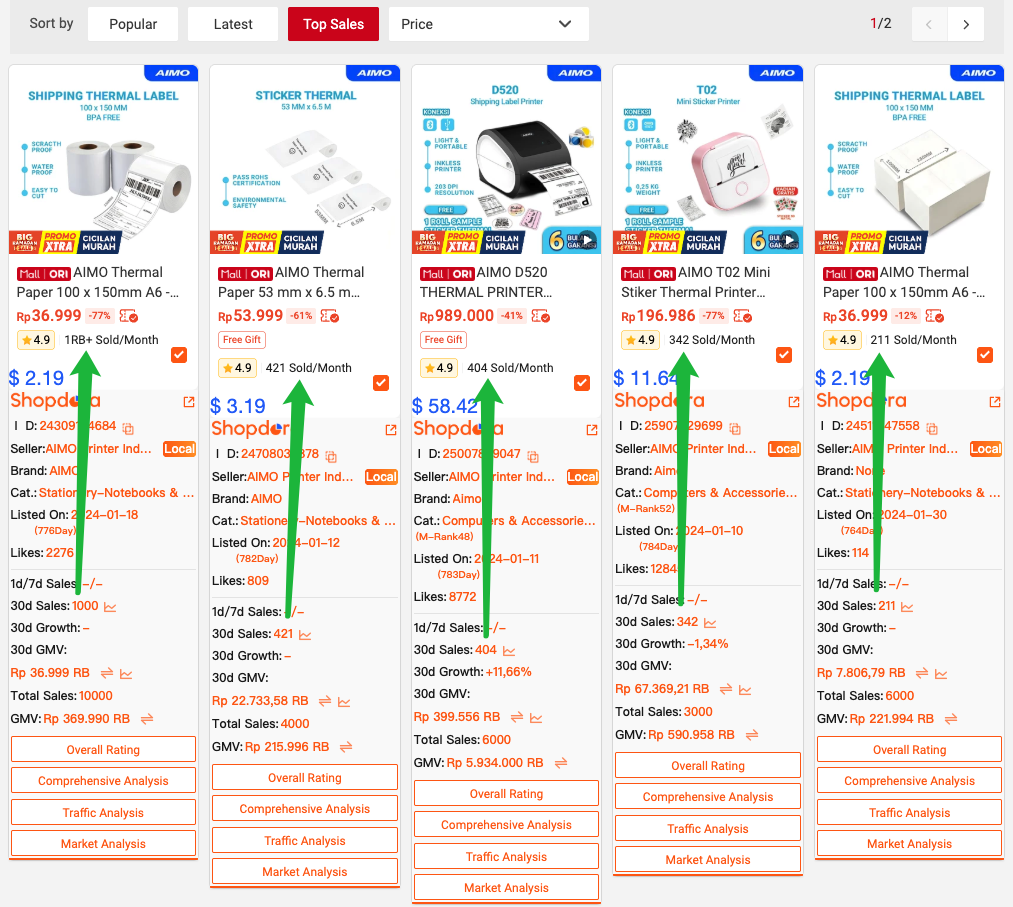
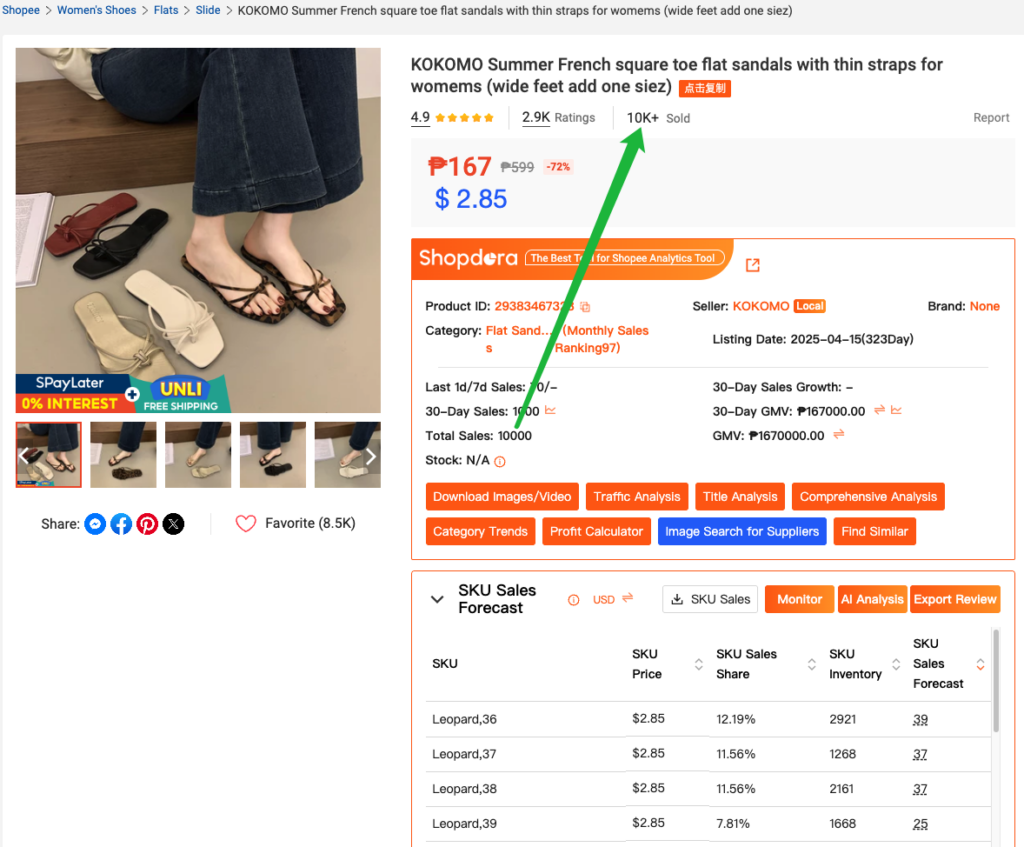
- 30-day Sales/Total Sales: Directly returned by Shopee’s official API, this is raw platform data.
- Last 1-day Sales: Calculated by monitoring the difference in total product sales.
- Last 7-day Sales: Accumulated from 7 consecutive days of 1-day sales data.
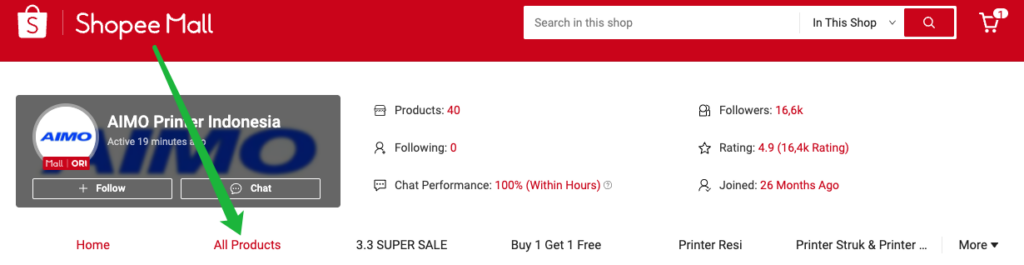
30-day Sales data comes from public information on the Shopee store page:
Enter the store → Click “All Products” → Switch to “Top sales” to view the product’s 30-day sales.
Total Sales: data is sourced from the product detail page.
1.2 Reasons for Ambiguous Sales Data
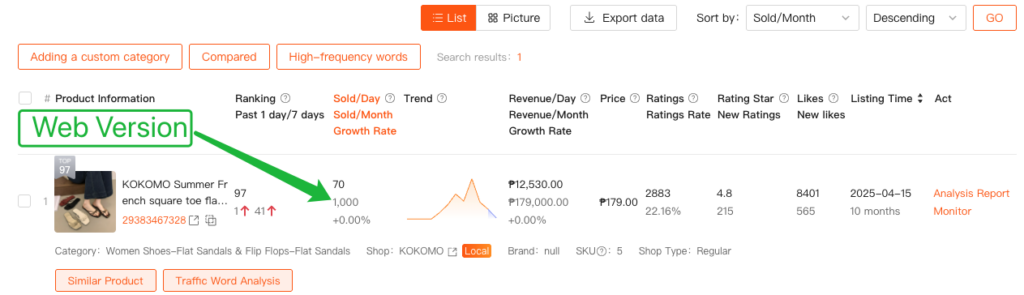
The sales data displayed by the plugin is obtained by real-time scraping from the Shopee front-end page. However, it’s important to note that Shopee’s front-end API itself only returns “ambiguous sales ranges” rather than precise figures. For example, large integers like 1000, 2000, 50000.
This “ambiguity” is not an error but an official simplified representation of sales ranges:
- 1000 → Indicates actual sales are in the range [1000, 2000)
- 2000 → Indicates actual sales are in the range [2000, 3000)
- 10000 → Indicates actual sales are in the range [10000+)
These ambiguous sales figures are directly collected from Shopee, and thus Shopdora’s plugin and website also display them in this manner.

2. Why are there discrepancies between plugin and web version data?
2.1 Accuracy Differences: Raw Data vs. Algorithmic Calibration
- Plugin Version (Raw Data): The plugin displays Shopee’s official front-end data in real-time. As mentioned earlier (1.2), the official platform typically uses a rounding strategy for ranges (e.g., displaying 1000, 50000), which is referred to as “ambiguous data.”
- Web Version (Algorithmic Calibration): The web version data undergoes processing through multi-channel collection + algorithmic evaluation. This allows for multi-dimensional assessment and calibration of the original range data, thereby correcting some monthly sales data (e.g., correcting the official 4000 to 4986 below).
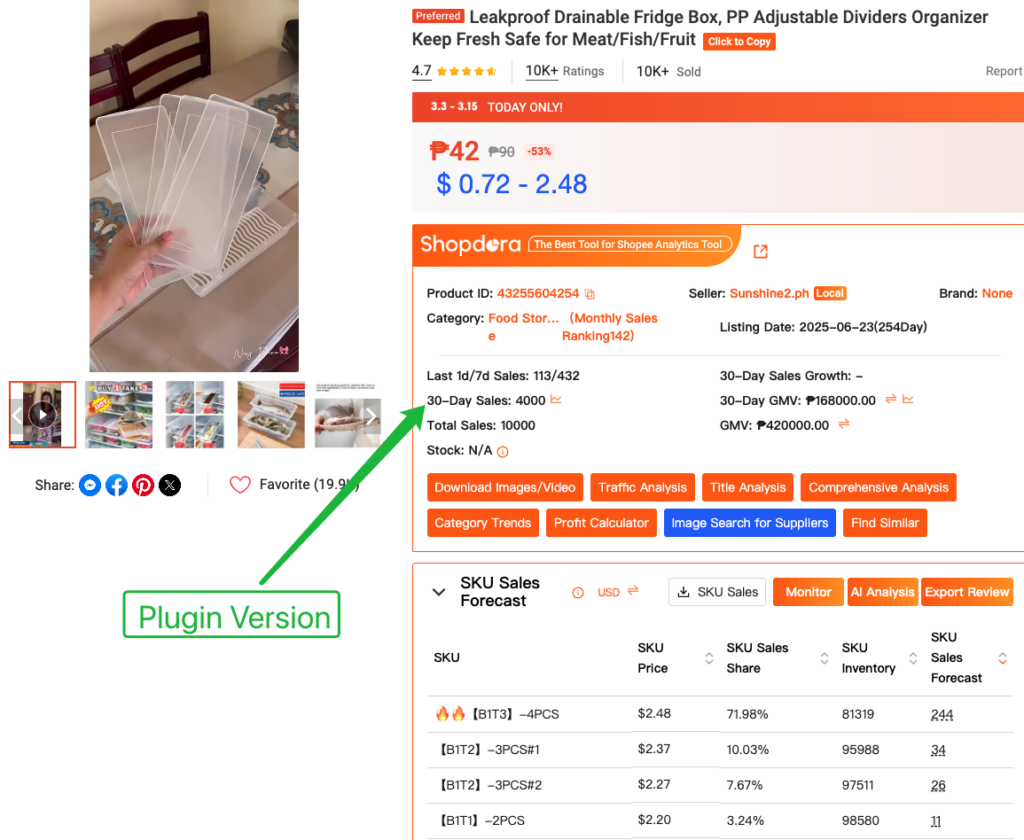
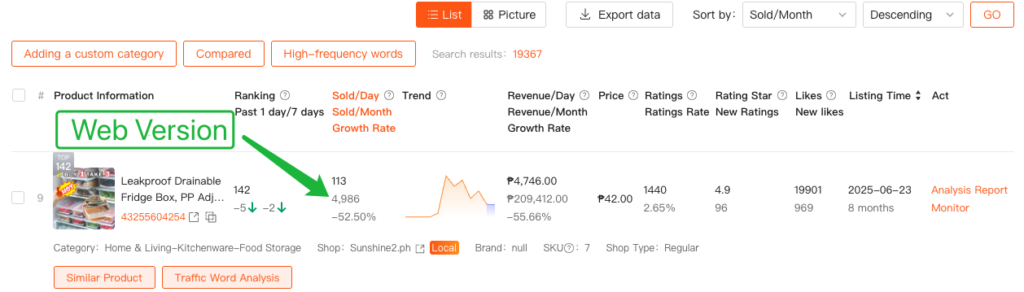
💡 Tip for Judgment: When you see precise non-integer monthly sales data (e.g., 4986) on the web version, it indicates that the data has been cleaned by algorithms and has higher reference value.
2.2 Time Differences: Data Update Asynchronicity
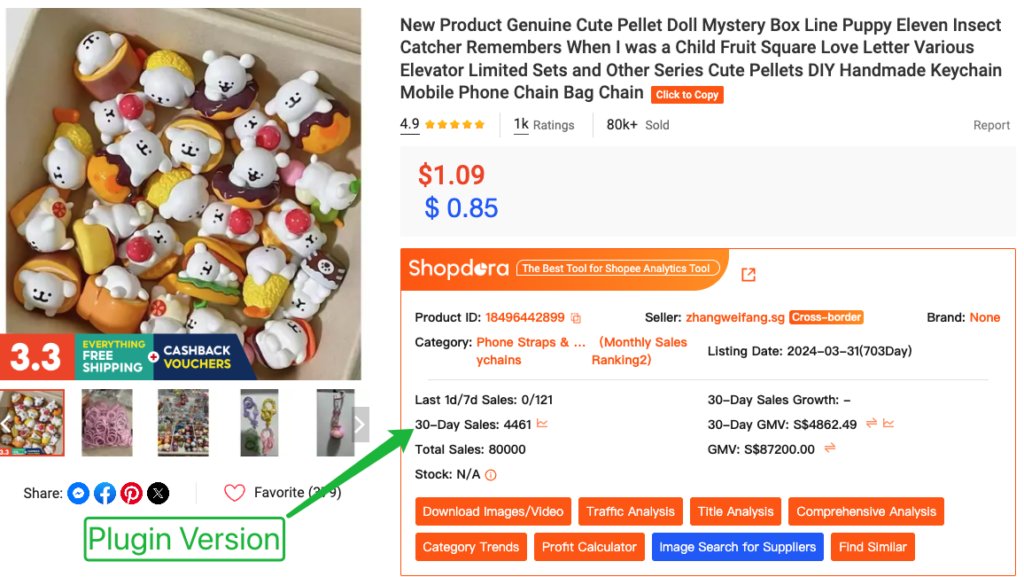
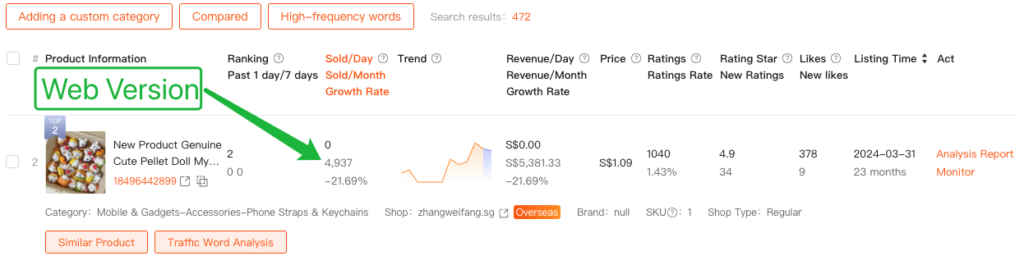
If both plugin and web data show specific accurate figures but the values are inconsistent, it is essentially due to differences in update speed:
- Plugin Version: Requires web version data to be confirmed as credible before synchronizing updates, leading to value discrepancies, which is normal.
- Web Version: Accurate data after algorithmic calibration is prioritized for display.
3. Practical Tips for Quickly Finding Accurate Data
As explained earlier (2.1), data on the Shopee web version with “larger monthly sales and non-ambiguous values” are corrected accurate data. To precisely find such data, refer to the following 2 methods:
3.1 Focus on Top-Selling Products in Rankings
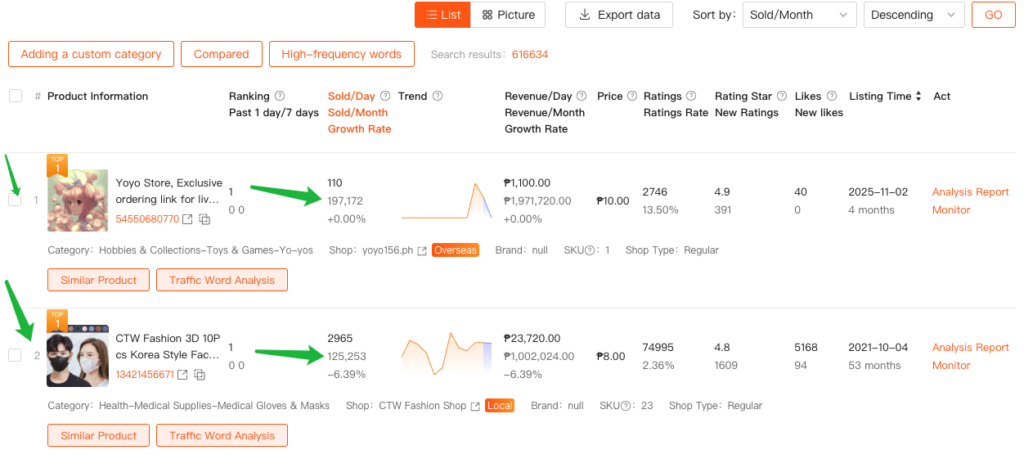
When selecting products, prioritize viewing the top products in the rankings. Due to the rich historical data of leading products, the system can more accurately calculate the specific value of 30-day sales (e.g., 197172).
3.2 Adjust Monthly Sales Growth Rate Filter Conditions
In the filtering settings, it is recommended to try setting the maximum value of “Sold Growth ” to 1000, which will make it easier to filter for accurate data.
4. When to Use the Plugin, and When to Use the Web Version?
Since the plugin’s sales data is obtained by real-time scraping from the Shopee front-end, and the web version’s data is collected through multiple channels and algorithmically calibrated, their data generation methods differ. It is strongly recommended to choose either the plugin or the web version as the primary data source for comparative analysis, and use the other as a reference. Maintaining consistent data sources ensures more scientific and reliable analysis results.
So, which data should be chosen as the basis for analysis? The following recommendations are provided:
4.1 Scenarios where using the [Web Version Data] is most efficient:
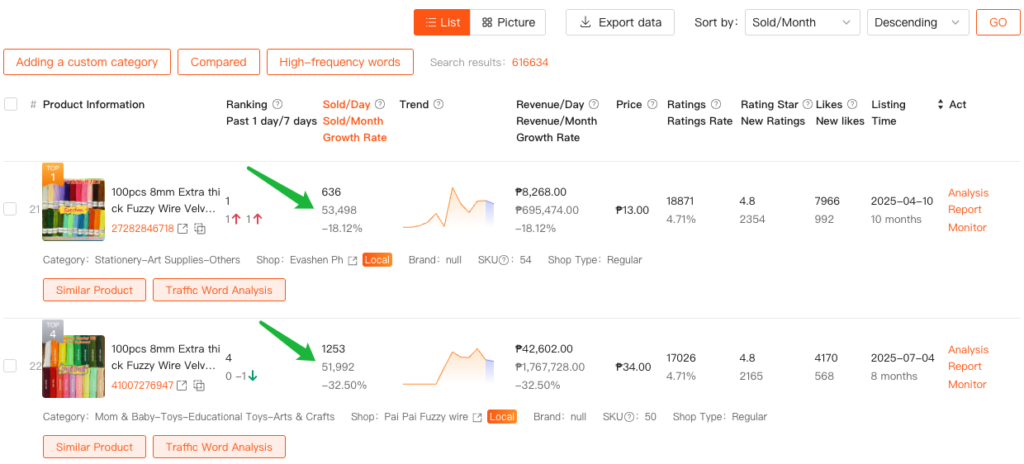
As mentioned in (3.1), when using the web version, please note: limit growth rate, filter out sales in thousands (ambiguous values like 1000/2000/5000)
- Scenario 1: High demand for data reliability, requiring algorithmically calibrated data closer to actual sales.
- Scenario 2: Front-end access is restricted, making it inconvenient to access Shopee’s front-end pages smoothly.
- Scenario 3: Product category has high monthly sales (>1000).
4.2 Scenarios where using the [Plugin Version Data] is most efficient:
- Scenario 1: Need to monitor real-time sales changes of competitors.
- Scenario 2: Need to analyze specific SKU data.
- Scenario 3: Product category has low monthly sales (< 1000).
4.3 Special Circumstance: Use Plugin Version when Web Version is affected by abnormal data
Shopee may intentionally display some fake sales data on the front end to prevent competitors from analyzing data. Although the web version filters out dirty data through algorithms, a very small amount might still be mistakenly absorbed, affecting the final display on the web version. When the web version data is heavily affected by dirty data, the plugin data should be used instead.
How to determine if web version data might be affected by abnormal data?
- Normally stable trends, but a sudden unreasonable surge in sales in a certain month.
- Sales curve does not match the overall market trend.
- Individual products suddenly surge while similar products in the same category show no significant growth.
If any of the above situations occur, it is reasonable to suspect abnormal interference with the web version, and using plugin data is recommended for more reliability.
4.4 Choose based on usage habits: Prioritize convenience
You can choose based on your usage habits:
If you find the plugin more convenient to operate and open, use the plugin version.
If you are accustomed to integrating data and viewing details on the web version, choose the web version.
