


Optimizing your product title is one of the most effective ways to boost visibility, clicks, and sales on Shopee. But how do you know which words actually drive traffic—and which ones are just taking up space? With Shopdora’s Title Analysis tool, you can turn guesswork into data-driven decisions—even if you’re not a keyword expert.
1. Why Title Analysis Matters
✅ Higher Search Visibility
Shopee’s algorithm prioritizes listings that match high-volume search terms. Including relevant keywords increases your chance of appearing in buyer searches.
✅ Better Click-Through & Conversion Rates
Clear, informative titles help shoppers instantly understand what you’re selling—especially on mobile, where screen space is limited.
✅ Free Organic Traffic
Unlike ads, optimized titles generate ongoing, cost-free exposure from Shopee’s internal search engine.
📌 Example:
A title like “Robot Vacuum” is too generic. But “Roborock S7 Robot Vacuum Cleaner, Ultrasonic Mopping, Auto-Lift Mop for Carpets” includes product name, brand, key features, and use cases—all proven search triggers.
2. How to Use Title Analysis Tool
Step 1: Access the Tool
Navigate to Keyword > Title Analysis.
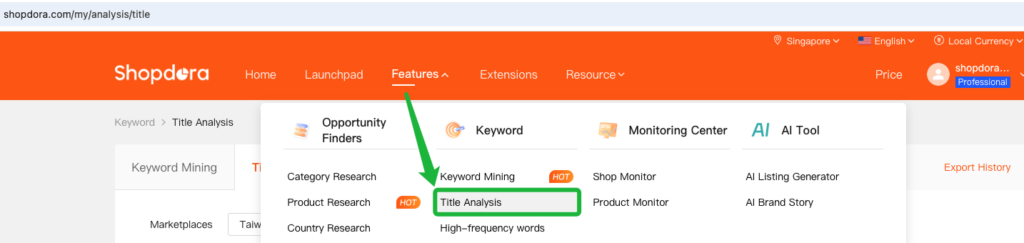
Step 2: Select Your Marketplace & Category
Choose the correct Marketplaces (e.g., Singapore) and Categories (e.g., Vacuum Cleaners & Floor Care Appliances).
Step 3: Enter Your Title
- For single-product analysis, enter the product’s complete title in the “Title” field.
- For multi-product analysis, paste all product titles into the same “Title” field. Then, in the “Product” field, enter a relevant category keyword—such as a brand name or category root keyword(not full title).
💡 Why “Product” Field matters:
The “Product” field defines the retrieval scope, ensuring that search results are more precise and contextually relevant.
For example:
- ✅ Correct “Product” fieldt:
Vacuum Cleaner, Robot Vacuum Cleaner,Dyson - ❌ Incorrect “Product” field:
My Best Vacuum,Cleaner, or leaving it blank
Step 4: Review the Diagnostic Report
1. Check Title Length:
- Short: < 40 characters → Too brief
- Average: 40–60 → Acceptable
- Great: ≥ 60 → Ideal for rich keyword inclusion

2. Keyword Performance Metrics:

| Column | Description |
|---|---|
| Keyword | The specific search term detected in your product title. |
| Category | The Shopee product category associated with this keyword. |
| Trend | Search trend over the past 30 |
| Search Volume (Avg. Daily Search) | The number of times the keyword has been searched on Shopee in the last 30 days.(Average daily searches for this keyword) |
| Search Growth | Month-over-month percentage change in search volume—indicates rising or declining interest. |
| PPC | Estimated cost-per-click in Shopee Ads (in USD). Lower values (e.g., $0.12) suggest less competitive keywords. |
| Products (DSR) | Products :Refers to how many related products appear after searching for this keyword; DSR= Average daily search volume (demand) / Number of Products (supply), used to assess the strength of demand. |
| Avg. Price/Ratings/Rating Star | The average price/ratings /rating star of products on the first 3 pages of Shopee search results (natural search results) for this keyword. |
3. Practical Methods to Optimize Your Title
Method 1: Check for Essential Elements
A high-converting title should include—in this order:
- Product name (e.g., “Robot Vacuum”) – tells users exactly what it is
- Brand (e.g., “Roborock”, “Xiaomi”) – builds trust and recognition
- Key features/specs (e.g., “5200Pa suction”, “APP control”, “HEPA filter”) – highlights differentiation
✅ Before: “Robot Vacuum Cleaner for Home”
✅ After: “Roborock S7 Robot Vacuum Cleaner, Ultrasonic Mopping, Auto-Lift Mop, Carpet Detection”
Method 2: Find High-Potential Missing Keywords
Witch to the tab: Unused hot keywords
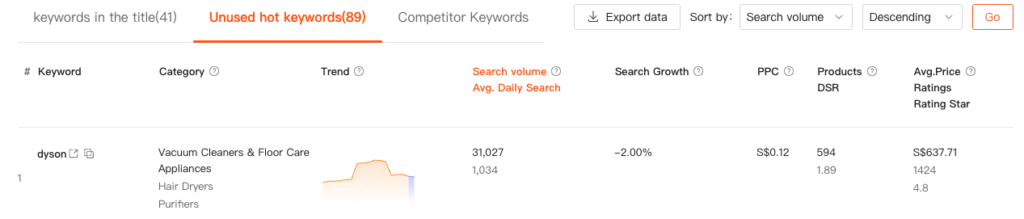
Here, you’ll see high-search terms that your current title doesn’t include but are popular in your category. 🔍 Look for:
- High search volume
- Strong growth trend
- Low PPC
✅ Add 1–2 of these only if they accurately describe your product.
→ Example: Identify popular search terms not yet included in your title—such as “quiet robot vacuum” or “steam cleaner”—and add only those that accurately describe your product.

Method 3: Benchmark Against Top Competitors
Witch to the tab: Competitor Keywords
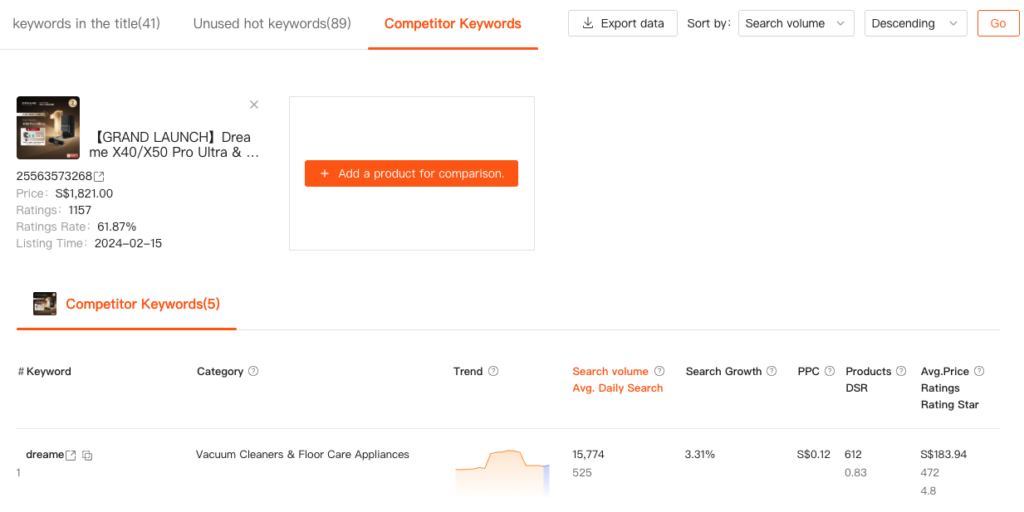
- Enter 1–3 competitor product links
- See which high-performing keywords they use that you don’t
- Adopt relevant terms only if they apply to your product
📌 Example:
A competitor uses “for Pet Hair,” which has 12,000+ monthly searches and low competition. If your vacuum also handles pet hair well, add a phrase like “Pet Hair Friendly” to your title.
4. Common Mistakes & How to Avoid Them
🚫 Mistake 1: Ignoring search volume vs. relevance
→ Fix: Don’t just chase high-volume terms. Only use them if they apply to your product. Misleading titles hurt conversion.
🚫 Mistake 2: Copying competitor titles directly
→ Fix: Use competitor data as inspiration, not a template. Focus on your unique value proposition.
🚫 Mistake 3: Not updating your title regularly
→ Fix: Review titles every 2–4 weeks using analysis tools. Trends shift—stay agile.
