In cross-border e-commerce, customer reviews are among the most authentic sources of buyer feedback. Shopdora’s Review Analysis feature enables sellers to efficiently uncover genuine customer needs, identify product strengths and weaknesses, and discover potential selling points.
1. Core Value
1.1. Support Product Selection Decisions
- By analyzing product reviews, sellers gain direct insights into buyers’ real needs and usage experiences, while also identifying existing product shortcomings.
- Systematically organizing strengths and weaknesses reflected in reviews helps highlight advantages and avoid common pitfalls during the product selection stage. This enables sellers to identify products with stronger market potential.
- In addition, review analysis data can be used to estimate the relative popularity and sales performance of different variants, supporting more informed inventory planning and reducing stock risk.
1.2. Optimize Product Listings
- Within the review analysis report, key product highlights and pain points mentioned most often by buyers are clearly presented.
- Based on these insights, sellers can optimize product titles, key selling points, and detail page content in a more targeted way. This helps buyers understand product value faster and more comprehensively, improving the clarity and efficiency of product information delivery.
1.3. Improve Conversion Performance
- By analyzing negative reviews, sellers can quickly identify issues raised by buyers and compare them with competitor reviews to understand competitive advantages and improvement opportunities.
- When necessary, operational strategies such as coupons or positive review incentives can be applied to gradually improve the review structure and overall perception. This helps convey a more positive product image to potential buyers and supports higher conversion rates.
1.4. Discover Selling Points and Uncover Real Demand
- Issues frequently mentioned in negative reviews, desired improvements, and buyer suggestions often reflect unmet or hidden customer needs.
- By systematically reviewing and organizing this feedback, sellers can uncover new potential selling points and gain valuable insights for product upgrades, feature optimization, or new product development.
2. Step-by-Step Guide
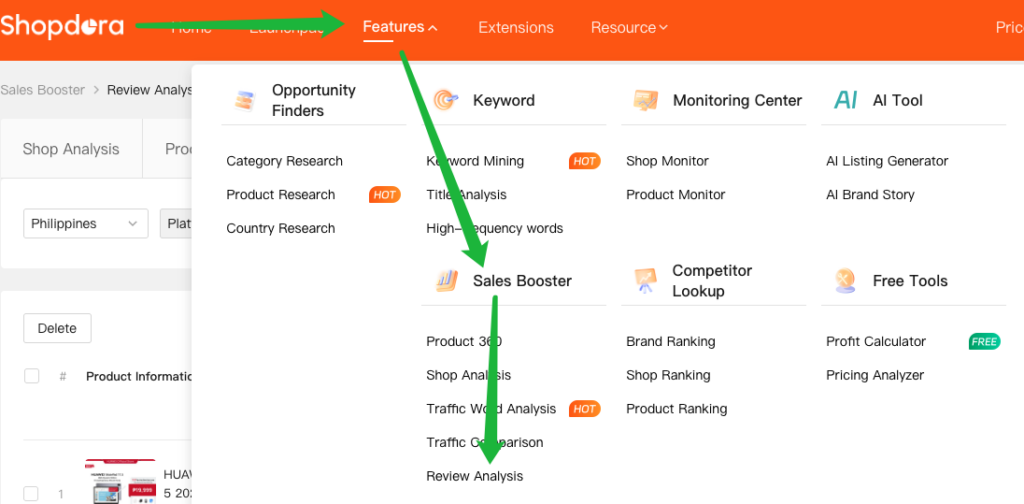
- Step 1: Access the Feature
- Navigate to Sales Booster → Review Analysis.
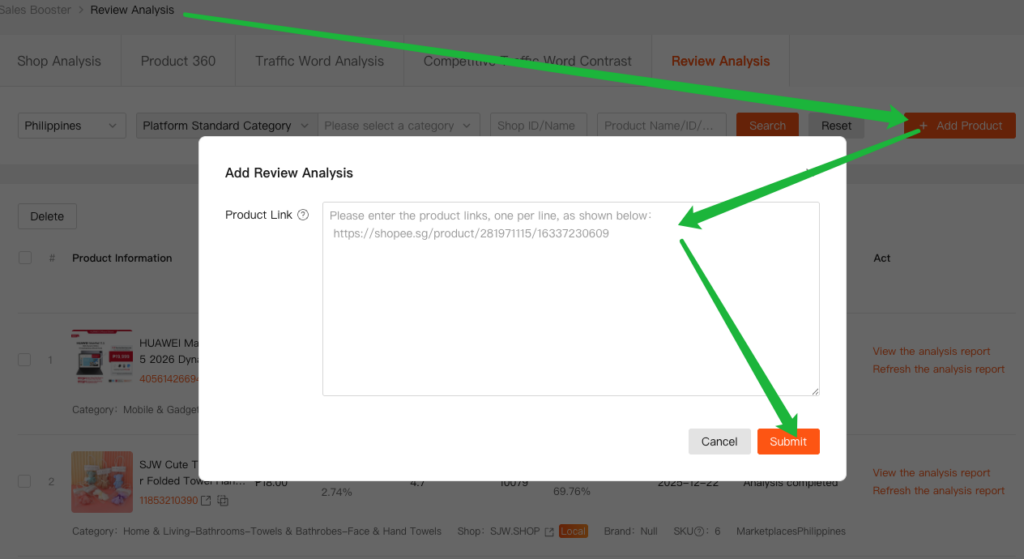
- Step 2: Add Products for Analysis
- Click + Add Product.
- Paste the product link you want to analyze.
- Click Submit.
- Note: Analysis typically takes 3–5 minutes.
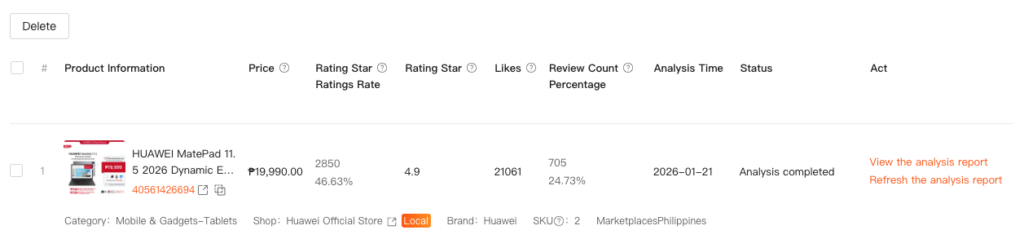
- Step 3: Generate or Refresh the Report
- After submission, the system automatically generates a basic analysis report:
- Note:To retrieve the latest review data, click Refresh the Analysis Report.
- After submission, the system automatically generates a basic analysis report:
3. Review the Analysis Report

3.1. SKU Analysis
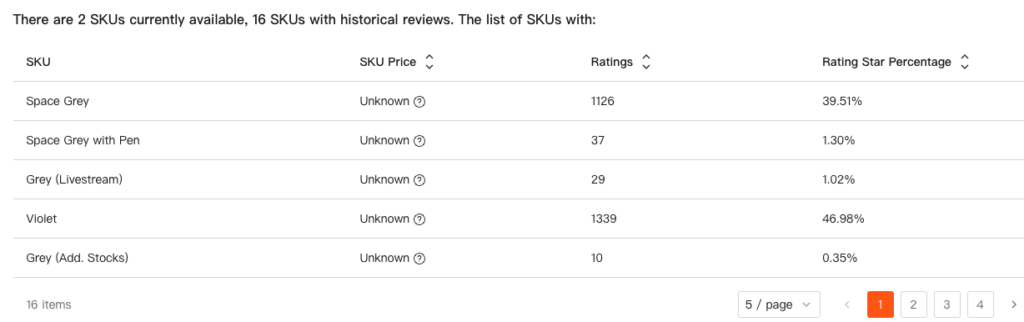
- Ratings & Rating Star Percentage
→ More Ratings indicate a higher Rating Star Percentage
→ Higher rRating Star Percentage is often associated with stronger sales performance - Identify the most popular SKUs and prioritize them for inventory planning and promotion.
3.2. Ratings and Review Structure
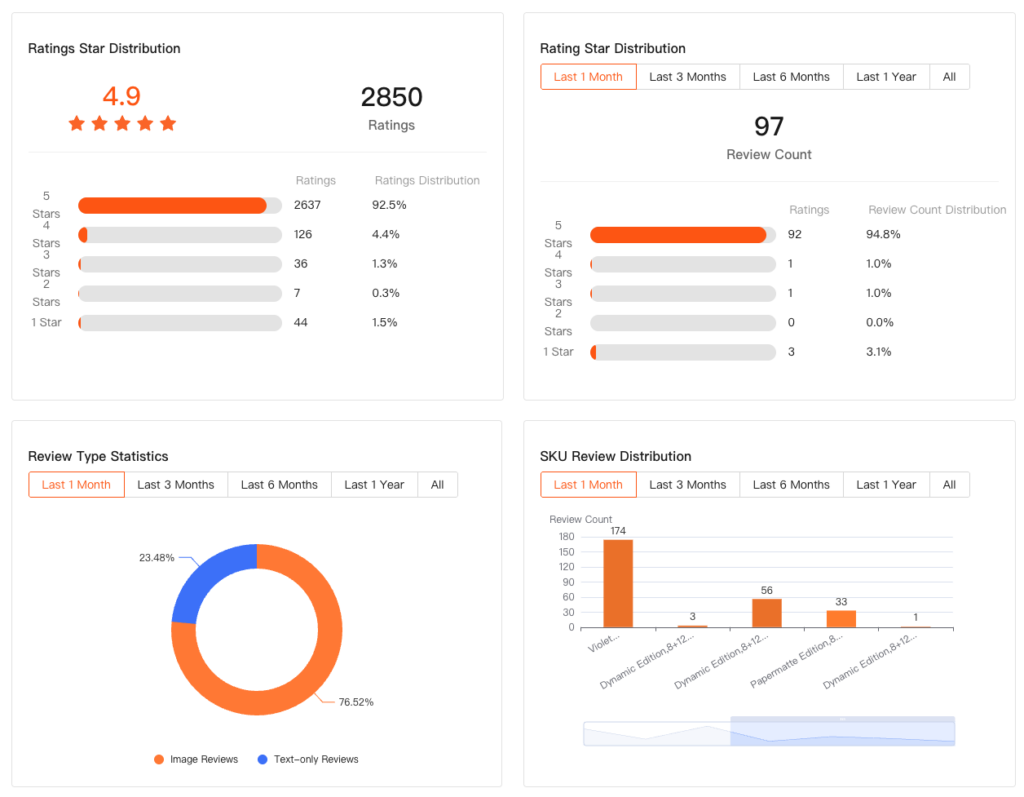
- Ratings Star Distribution: Shows the number of ratings at each star level and their proportion of the total ratings.
- Ratings Distribution: Shows the number of reviews at each star level and their proportion of the total reviews.
- Review Type Statistics: Image Reviews vs. Text-only Reviews.
- SKU Review Distribution: This feature helps sellers approximate the sales performance of different SKUs based on review data, quickly identifying the most popular SKUs and providing insights for product selection and creating bestsellers.
- Sellers can compare the number of reviews for each SKU within the same time period to evaluate market performance. Generally, SKUs with more reviews in the same time frame indicate better sales performance and higher customer acceptance.
3.3. SKU Review Trend
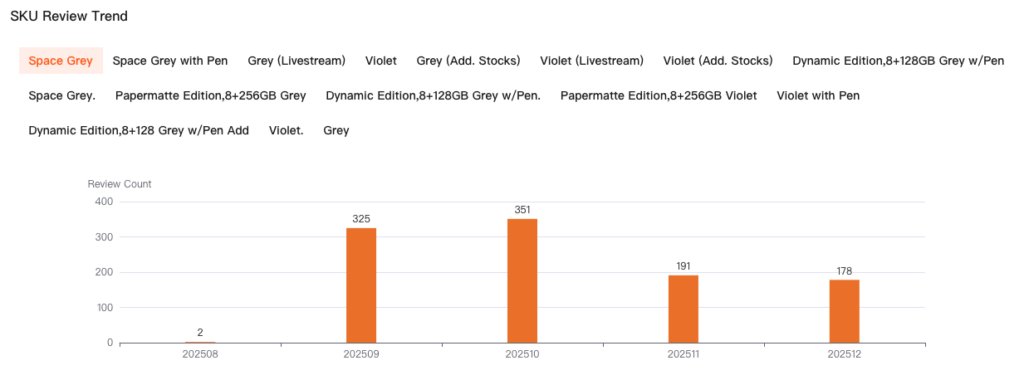
- This feature allows sellers to select different SKUs and infer their sales trends based on changes in review patterns, helping assess performance across peak and off-peak seasons.
- By analyzing these trends, sellers can plan inventory and restocking more effectively, reducing the risk of stockouts or overstock.
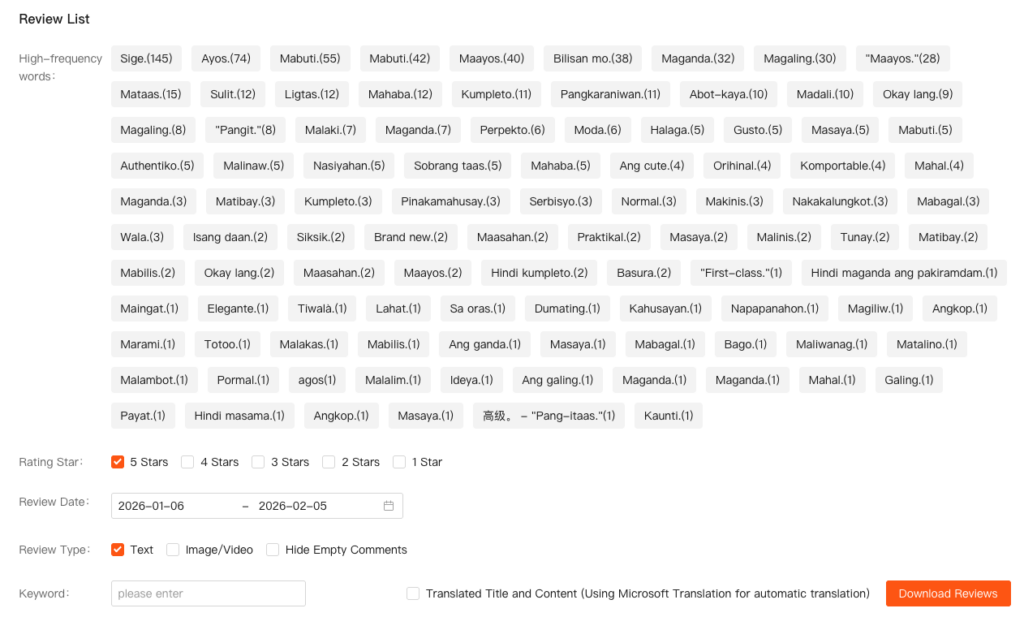
3.4. Review List
- Quickly access positive and negative reviews to deeply explore product pain points and selling points.
- Filter Options: High-frequency words, Rating Star, Review Date, Review Type, Keyword.
- High-Frequency Words Focus: High-frequency words highlight the features most noticed and appreciated by users. If high-frequency words are concentrated in negative reviews, they typically indicate the main issues of the product. Sellers can use this insight to optimize the product itself and the listing description, enhancing overall competitiveness.
- Download Reviews: For more in-depth analysis, sellers can download review data locally for custom analysis and research, supporting more refined product and operational decisions.