This guide provides a comprehensive overview of Shopdora, your all-in-one Shopee success engine, designed to empower sellers with data-driven insights for enhanced operational efficiency and sales performance. Shopdora offers powerful tools to help you discover winning products, optimize keywords, monitor competitors, and boost sales.
1. Shopdora Platform Overview: Web Version vs. Extension Version
Shopdora provides a flexible and powerful experience through two main interfaces:
Web Version: The comprehensive web platform offers in-depth data analysis, reporting, and management features. It serves as your central hub for strategic planning and detailed market research.
Extension Version : The Shopdora browser extension seamlessly integrates with your Shopee browsing experience. It allows for direct viewing of real-time data and quick insights while navigating Shopee web pages, significantly enhancing operational efficiency and enabling agile, data-backed decisions on the go.
2. Data Export and Interactive Elements
Data Export: Shopdora supports data export for various analyses. Once an export is completed, the generated file can be conveniently downloaded from the “Export History” section, typically located under your avatar or profile menu.
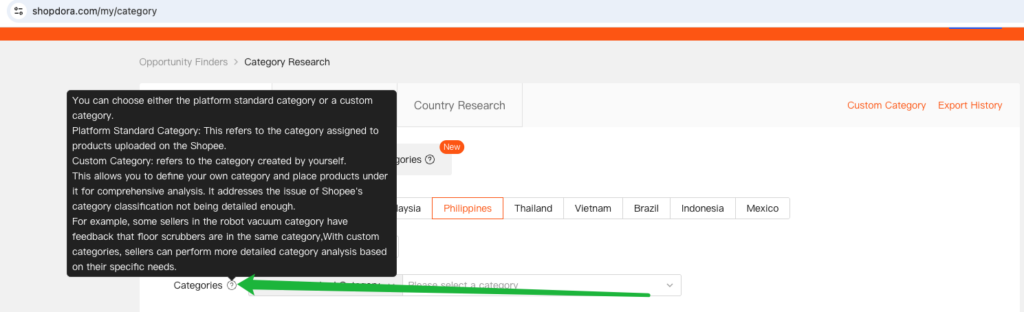
Interactive Tooltips: Throughout the Shopdora web interface, you will encounter a question mark icon (?). Hovering your mouse over these icons will display a brief explanation or definition of the associated professional term, ensuring clarity and ease of understanding for all users
3. Shopdora Core Features Introduction Guide
This guide provides a detailed introduction to core features within the Shopdora platform, designed to help Shopee sellers drive data-driven decisions, enhance store operational efficiency, and boost sales performance.
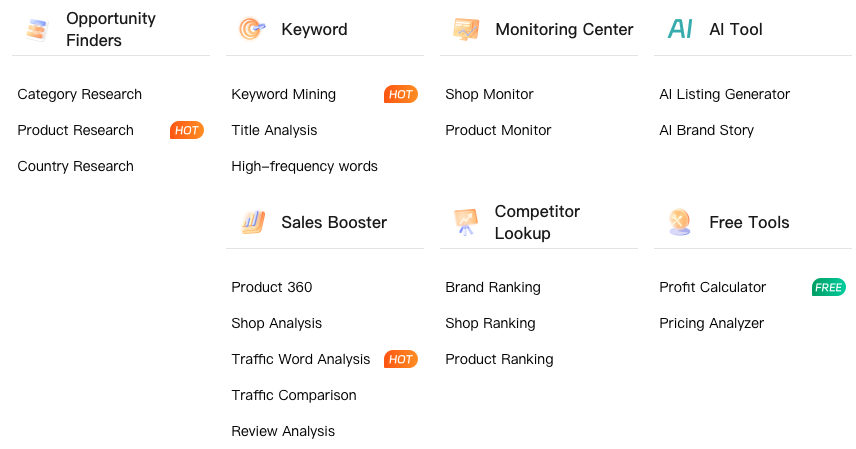
Analyzes category data across various Shopee sites, using market demand, competition intensity, and market fluctuation as key indicators to help sellers identify high-potential “blue ocean” categories and avoid blind entry.
Offers comprehensive product data analysis, including dimensions like “Hot Products” and “Rising New Products.” By analyzing competitor sales and consumer preferences, it helps sellers accurately select products and mitigate selection risks.
Supports side-by-side comparison of the same category\’s performance across nine major Shopee marketplaces. This helps sellers identify market differences and determine which marketplaces are best for priority entry or focused expansion.
Starting from a target keyword, it expands related vocabulary through associated products. This helps sellers build extensive keyword libraries, increase product search entry points, and acquire more organic traffic.
Diagnoses the quality of product titles, analyzing title length and keyword coverage. It provides suggestions for “unused hot keywords” to help sellers optimize titles for improved search rankings and click-through rates.
Batches analyzes high-frequency words in multiple competitor titles, distinguishing between “title high-frequency words” and “traffic high-frequency words.” This helps sellers quickly extract high-value keywords and optimize ad placements.
Displays the top 300 brand rankings within a specific category. By analyzing the sales, revenue, and product distribution of leading brands, it helps sellers identify market leaders.
Quickly identifies the top 300 leading shops within a category. Sellers can learn from successful shops\’ operational strategies and add them to monitoring for continuous tracking of their dynamics.
Real-time display of top-selling product rankings in the market. By evaluating competitor performance with multi-dimensional data, it helps sellers capture market trends and optimize product selection.
Real-time tracking of competitor sales trends, new product launches, and product structure. By monitoring competitor dynamics, sellers can timely adjust their listing pace and marketing strategies.
In-depth tracking of specific competitor product price changes, sales growth, and review variations. By comparing data between their own products and competitors, sellers can discover market opportunities and optimize product performance.
Provides a comprehensive diagnosis of products across five core dimensions: title, price, promotions, advertising, and reviews. It accurately identifies reasons for low conversion rates and offers specific optimization recommendations.
Conducts a comprehensive evaluation of Shopee stores, analyzing store health, sales rankings, and product distribution. This helps sellers understand the overall operational strength of their own or competitor stores.
Identifies keywords that genuinely drive traffic to products, distinguishing between “organic traffic keywords” and “ad traffic keywords.” It helps sellers monitor keyword ranking trends and optimize ad bids.
Compares traffic keywords between one\’s own products and competitors, identifying unique traffic sources that competitors have but are missing from one\’s own. By filling these gaps, sellers can narrow the distance to top competitors.
Deeply analyzes customer reviews to uncover genuine needs and pain points. By examining review structures and high-frequency words at the SKU level, it provides insights for product selection, improvement, and selling point refinement.
Leverages AI technology and the Shopdora keyword database to quickly generate or optimize product titles and descriptions. It supports automatic multi-language translation, significantly improving cross-border sellers\’ listing efficiency.
Automatically generates unique and engaging brand stories based on brand information provided by sellers. This helps sellers shape brand image and strengthen emotional connections with consumers.
Contact the product manager via WhatsApp to communicate your requirements