





If you have already purchased a Shopdora plan and need more features or sub-accounts, you can upgrade to a higher-tier plan at any time.
For example:
- Your team initially purchased the Standard Plan.
- As the team grows, you need to upgrade to the Advanced or Professional Plan.
How to Upgrade Your Plan
Step 1: Go to the Price Page
- Log In to Your Shopdora Account
- Navigate to the Price page:

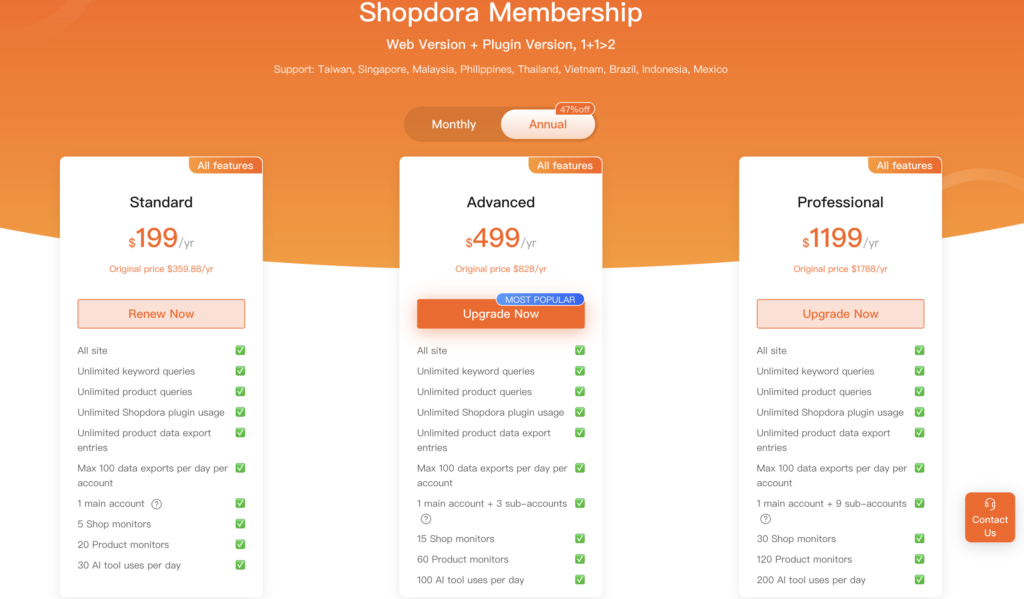
Step 2: Select a Higher-Tier Plan
- This page displays all available subscription plans.
- Choose a plan that is higher than your current subscription.
- Click “Upgrade Now” under the selected plan.
Step 3: Complete the Payment
During the upgrade process:
- The system automatically deducts the remaining value of your current plan.
- Only the price difference needs to be paid.
- The upgrade takes effect immediately after payment is completed.
